
Most Web Apps Have the Same Security Design Flaw

Most web applications still use an authentication pattern that is less secure, more complex, and more expensive than necessary. Modern guidance from NIST and OWASP increasingly recommends reducing reliance on memorized secrets. Password systems became the default because frameworks scaffold them and tutorials repeat them. But the design hides an architectural choice: the application becomes responsible for storing and defending user secrets indefinitely.
Passwords are the COBOL of authentication. They refuse to die.
The more interesting question is not how to secure password databases, but why we build them at all.
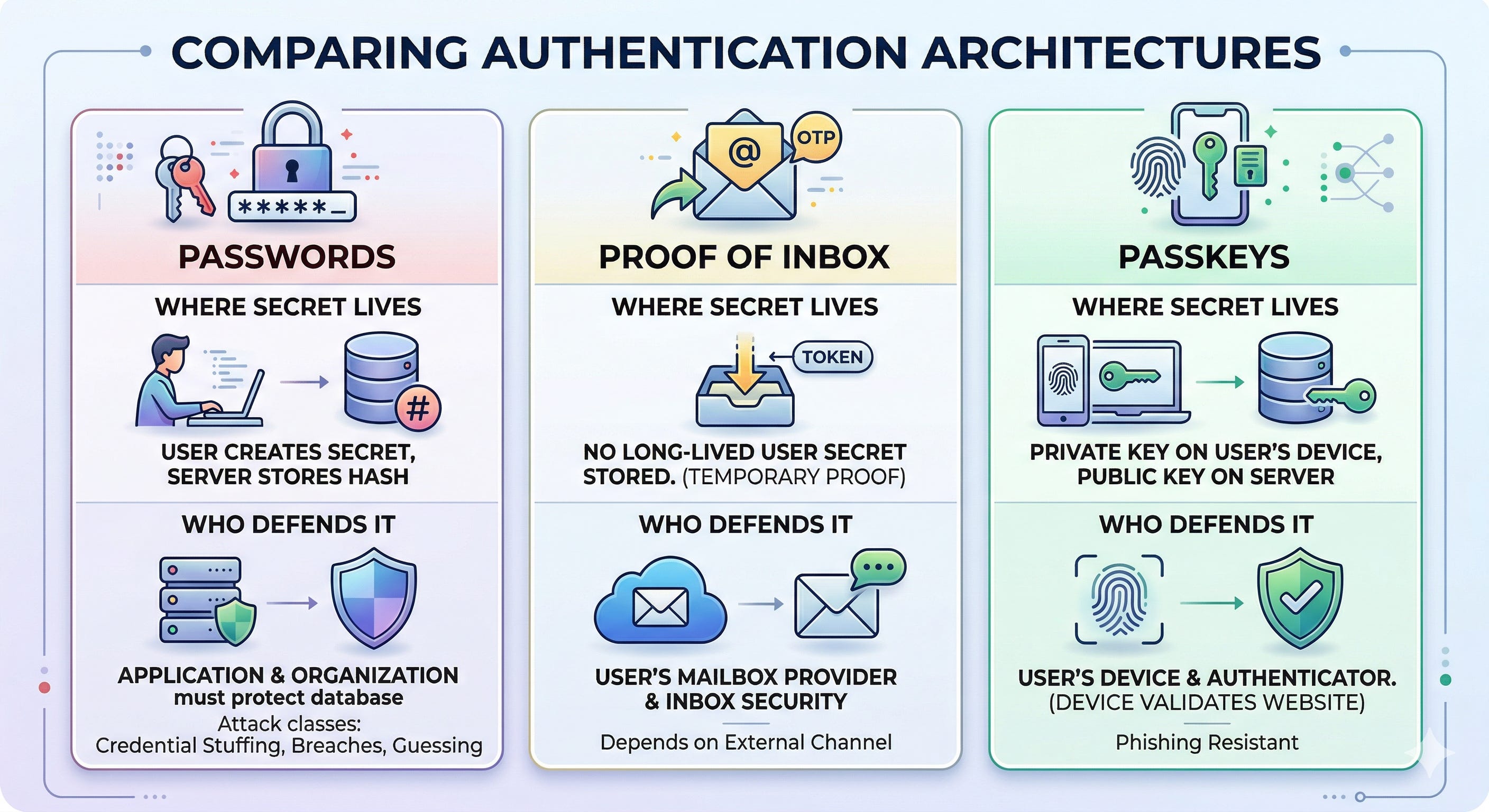
Authentication systems differ mainly in where secrets live — and who must protect them.
Three Authentication Architectures
Most web applications today use one of three authentication architectures:
Shared secrets stored by the server (passwords).
Temporary proofs delivered through an external channel (email OTP or social login).
Public-key authentication using device-held credentials (passkeys).
Each design moves the location of secrets and therefore the location of risk.
We’ve always done it this way
Passwords implement a shared-secret architecture. The user creates a secret and the server stores a derived version. Authentication succeeds when both sides demonstrate knowledge of the same secret.
Even when implemented correctly (with modern hashing such as argon2id, breach screening, and brute-force protection) the system must defend an attack surface created by the existence of those secrets.
Password systems introduce several attack classes: credential stuffing, password reuse, guessing, phishing, and offline cracking after database breaches.
The 2012 LinkedIn breach illustrates the problem. Once attackers obtained millions of password hashes, they could crack them offline indefinitely without interacting with LinkedIn’s servers.
Credential stuffing remains one of the most common causes of account takeover today. Attackers reuse passwords leaked from other breaches and automate login attempts across services.
Storing passwords forces you to build an entire defensive subsystem: hashing and storage, reset flows, brute-force protections, breached-password checks, and account recovery mechanisms. Password policies attempt to enforce entropy. Users respond with creativity.
We could have done it like that
Email-based authentication follows a different model. Instead of storing a long-lived secret, the application verifies that the user currently controls an external communication channel — usually an email inbox.
Typical flow:
User enters email.
The system sends OTP or a magic link.
The user proves access to the inbox.
Because the system stores no user-generated secrets, several password-specific attacks disappear entirely. There are no passwords to reuse, guess, or crack after a database breach.
However, the trust boundary shifts. Security now depends heavily on the availability and secrecy of the user’s mailbox.
We should be heading this way
Passkeys represent a third architecture based on public-key cryptography. During signup, the user’s device generates a key pair. The public key is registered with the server while the private key remains on the device. During login, the server sends a challenge that the device signs using the private key, typically unlocked with biometrics or a device PIN.
No shared secret exists between the server and the user. Because the server stores only public keys, credential databases become far less valuable to attackers. Passkeys also provide strong phishing resistance: authenticators verify the origin of the requesting website before signing a challenge. After Google deployed hardware security keys internally, phishing attacks against those accounts effectively dropped to zero.
In practice, passkey deployments still require recovery mechanisms (often email) which reintroduces some properties of proof-of-inbox systems.
Comparing the Architectures
Viewed as architectural patterns, the differences become clearer. Each model shifts where secrets live and therefore where security risks concentrate.
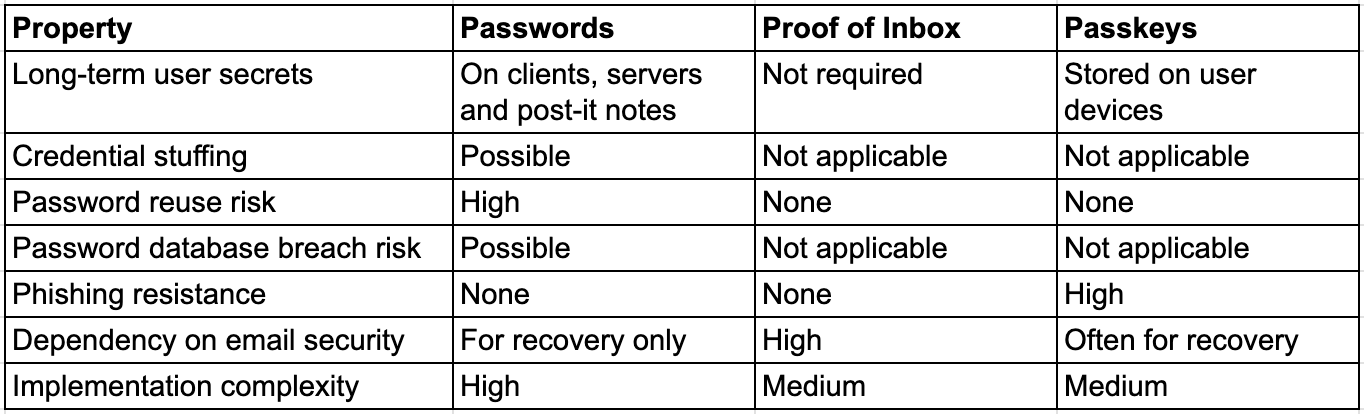
Passwords create an entire category of security problems that disappear if you stop storing them.
Migrating from Passwords to Passkeys
Most production systems cannot remove passwords overnight. In practice, teams migrate gradually. A common rollout starts by allowing users to register a passkey after logging in with their existing password. The device generates a key pair, and the server stores the public key alongside the existing account.
Once passkeys are registered, the login flow can begin preferring passkeys over passwords. Browsers increasingly suggest them automatically through WebAuthn, which reduces login friction. After adoption grows, passwords can be disabled for accounts that already have passkeys. Recovery typically relies on email verification or previously registered devices rather than stored user secrets.
Over time the password subsystem becomes a compatibility layer instead of the primary authentication mechanism.
The Cost of Storing Passwords
Authentication architecture does not just affect security risk. It determines how much operational security work your organization will have to do for the lifetime of the system.
Shared-secret authentication creates a permanent defensive obligation. Once an application stores user passwords, the organization becomes responsible for protecting a database that attackers actively want to steal. That responsibility propagates outward: password hashing infrastructure, reset and recovery flows, brute-force detection, breached-password screening, account takeover monitoring, and incident response procedures. Each layer exists because the system stores long-lived secrets.
Over time this becomes an operational cost. Credential-stuffing campaigns generate investigation noise. Account recovery flows become a common takeover vector. Authentication code requires periodic refactoring as standards evolve. Security teams spend time triaging alerts, investigating suspicious login patterns, and responding to reports from bug bounty researchers who find weaknesses in authentication flows.
Proof-of-inbox systems remove much of that lifecycle because the system no longer stores a long-term secret. Passkeys go further by eliminating shared secrets entirely: the server stores public keys rather than credentials worth stealing. The result is not perfect security, but a much smaller class of problems to defend.
From a security leadership perspective, this distinction matters. Fewer stored secrets means fewer breach targets, fewer credential-stuffing incidents, fewer account-recovery compromises, and fewer authentication bugs to fix later. In practice that translates directly into fewer investigations, fewer support tickets, and fewer engineering cycles spent hardening login systems.
The simplest way to secure a secret is not to store it in the first place. Architectures that avoid shared secrets do not just reduce risk — they reduce the amount of security work an organization will ever need to perform.
How Passwords Create Systemic Risk
Password systems also shift the security burden onto users. A typical user manages dozens or hundreds of accounts, each ideally requiring a unique password. In practice, passwords are reused across services. When one service is breached, attackers try those credentials elsewhere: a technique known as credential stuffing.
A single breach can cascade across hundreds of unrelated platforms because the same passwords are reused. If the web relied less on memorized secrets, this entire attack class would likely be far smaller.
Conclusion
Passwords became dominant because they were simple to implement in the early web. But their architecture forces applications to collect and defend user-generated secrets indefinitely.
Modern authentication systems increasingly avoid this pattern.
Passkeys eliminate shared secrets entirely using device-held cryptographic keys. Email-based authentication removes long-lived secrets but shifts trust to the email system.
For many applications the decision can be simplified:
If your users already rely heavily on email, proof-of-inbox authentication is often the simplest architecture.
If you are building a new system with strong security requirements, passkeys remove entire classes of authentication risk.
Passwords are usually best reserved for legacy compatibility rather than new designs.
The underlying principle is simple: the safest secret is the one your system never has to store.
If you cannot deploy passkeys yet, you probably still do not need to build another password subsystem.
References
[1] NIST SP 800-63B, Digital Identity Guidelines
https://pages.nist.gov/800-63-3/sp800-63b.html
[2] OWASP Authentication Cheat Sheet
https://cheatsheetseries.owasp.org/cheatsheets/Authentication_Cheat_Sheet.html
[3] OWASP Application Security Verification Standard, Authentication Requirements
https://github.com/OWASP/ASVS/blob/master/5.0/en/0x15-V6-Authentication.md
[4] Verizon Data Breach Investigations Report
https://www.verizon.com/business/resources/reports/dbir/
[5] Have I Been Pwned
https://haveibeenpwned.com/
[6] WebAuthn Level 2 Specification
https://www.w3.org/TR/webauthn-2/
[7] FIDO Alliance, Passkeys Explained
https://fidoalliance.org/passkeys/
[8] Google Security Blog, Security Keys Neutralize Phishing Attacks
https://security.googleblog.com/2019/05/new-research-how-effective-are.html
[9] Google Transparency Report, Safer Email
https://transparencyreport.google.com/safer-email/overview
[10] LinkedIn Breach 2012
https://krebsonsecurity.com/2016/05/linkedin-confirms-account-passwords-hacked/